Techvia TMS tracks carrier insurance from the expiry dates you enter on each carrier’s Insurance tab. The Compliance page lists everything that has expired or will expire in the next 30 days, with a countdown. And when you try to assign a carrier whose insurance has lapsed, Techvia refuses to save the load. Here’s how each part works, tested with a carrier whose liability cover had run out.
Insurance is only one part of vetting. The broader process is in the freight broker carrier vetting process and the carrier onboarding checklist.
Step 1: Record the certificate details
Open the carrier under Operations → Carriers and go to the Insurance tab. There are three sections:
- Liability insurance: general liability.
- Auto insurance: commercial auto or fleet cover.
- Cargo insurance: cover for the freight itself.
Each takes the insurance company, policy number, expiry date, coverage amount, an agent contact and notes. The expiry date is what drives everything below, so take it from the certificate of insurance (COI), not from memory. Details for setting up carriers are in adding customers, facilities and carriers.
Step 2: Check the Compliance page
Operations → Compliance shows insurance, licences and registrations that need attention, grouped by urgency:
- Expired: past the expiry date, with how many days overdue.
- Next 7 days: about to lapse.
- Next 30 days: coming up, with the days left.
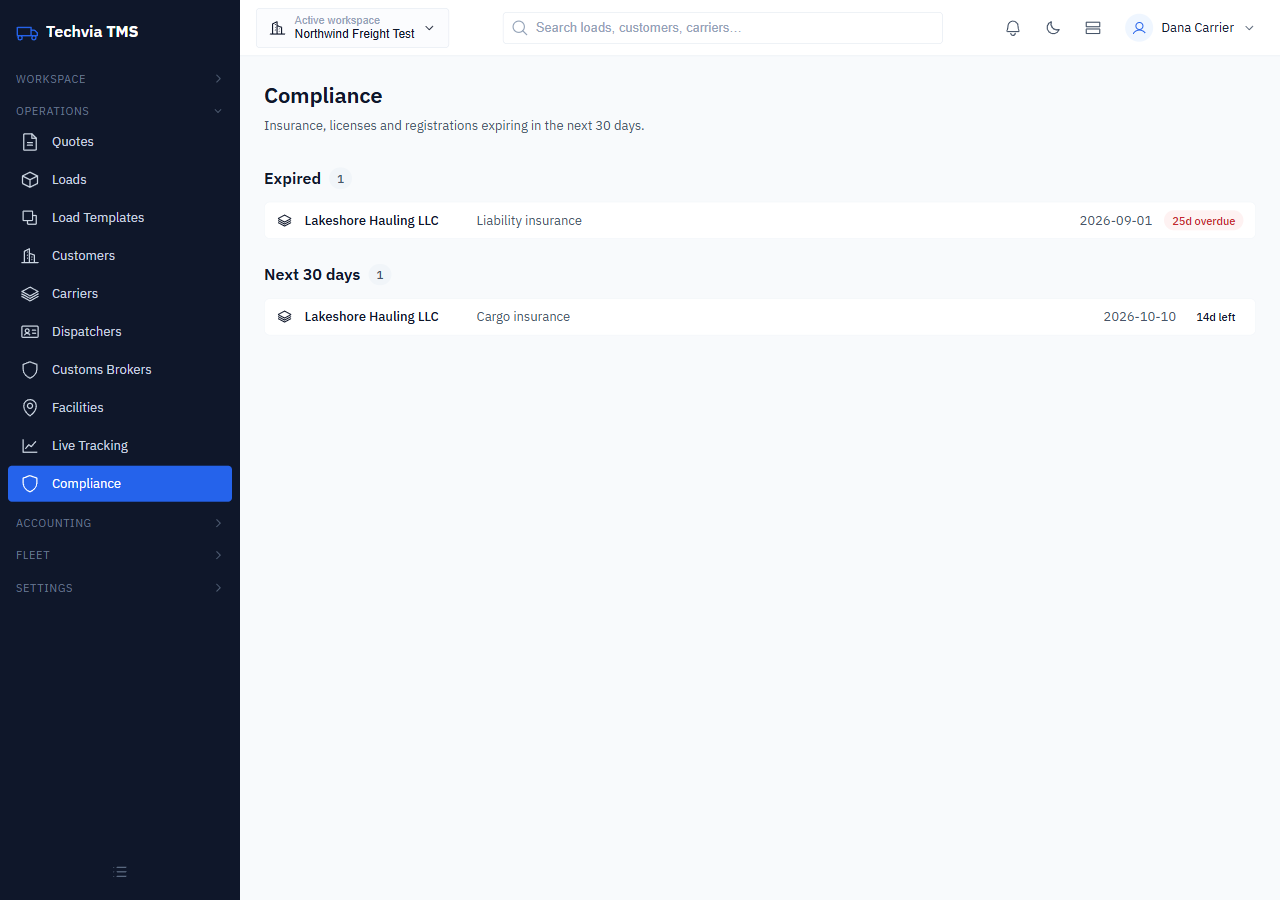
In our test, a liability policy that ended September 1 showed as 25d overdue, and a cargo policy ending October 10 showed 14d left. When nothing needs attention, the page says “All documents are current.”
A good habit is to check this page at the start of every week and request fresh COIs for anything in the 30-day list before it lapses, not the day a load needs covering.
Step 3: Let the system stop the bad booking
Here’s the part that protects you when someone is moving fast. We tried to assign the carrier with the expired liability policy to a new load, and Techvia would not save it. The server rejected the assignment because the carrier had expired insurance (liability).
Carrier compliance only matters if it’s checked at the moment of booking, and here it’s enforced by the system rather than left to a dispatcher’s memory. The fix is to get an updated COI, update the expiry date on the carrier’s Insurance tab and assign again.
Beyond carriers
The Compliance page also covers drivers. Each driver’s License & Compliance tab holds the CDL expiry, medical card expiry, drug test dates and passport, FAST card and hazmat expiries. When we set a driver’s licence to expire in five days, it appeared on the Compliance page under Next 7 days as “CDL license, 5d left”. Trucks have their own Registration & Compliance tab. Keeping those dates current turns the Compliance page into a single weekly to-do list for renewals.
Try it yourself
Techvia TMS includes compliance tracking and insurance checks at booking. It’s $49 a month with unlimited users, and no credit card is needed to start.